
Meta Description:
How M-Pesa Integration Changed School Fee Collection in Kenya
By Cloud School System Team | cloudschool.co.ke
Every term, thousands of Kenyan school bursars face the same problem. Parents send M-Pesa payments. The bursar checks their phone. They open a spreadsheet. They find the student’s name. They update the balance manually. Then they print a receipt. Then they file it.
That process takes three to five minutes per transaction. For a school with 500 students paying termly fees, that is hours of work.
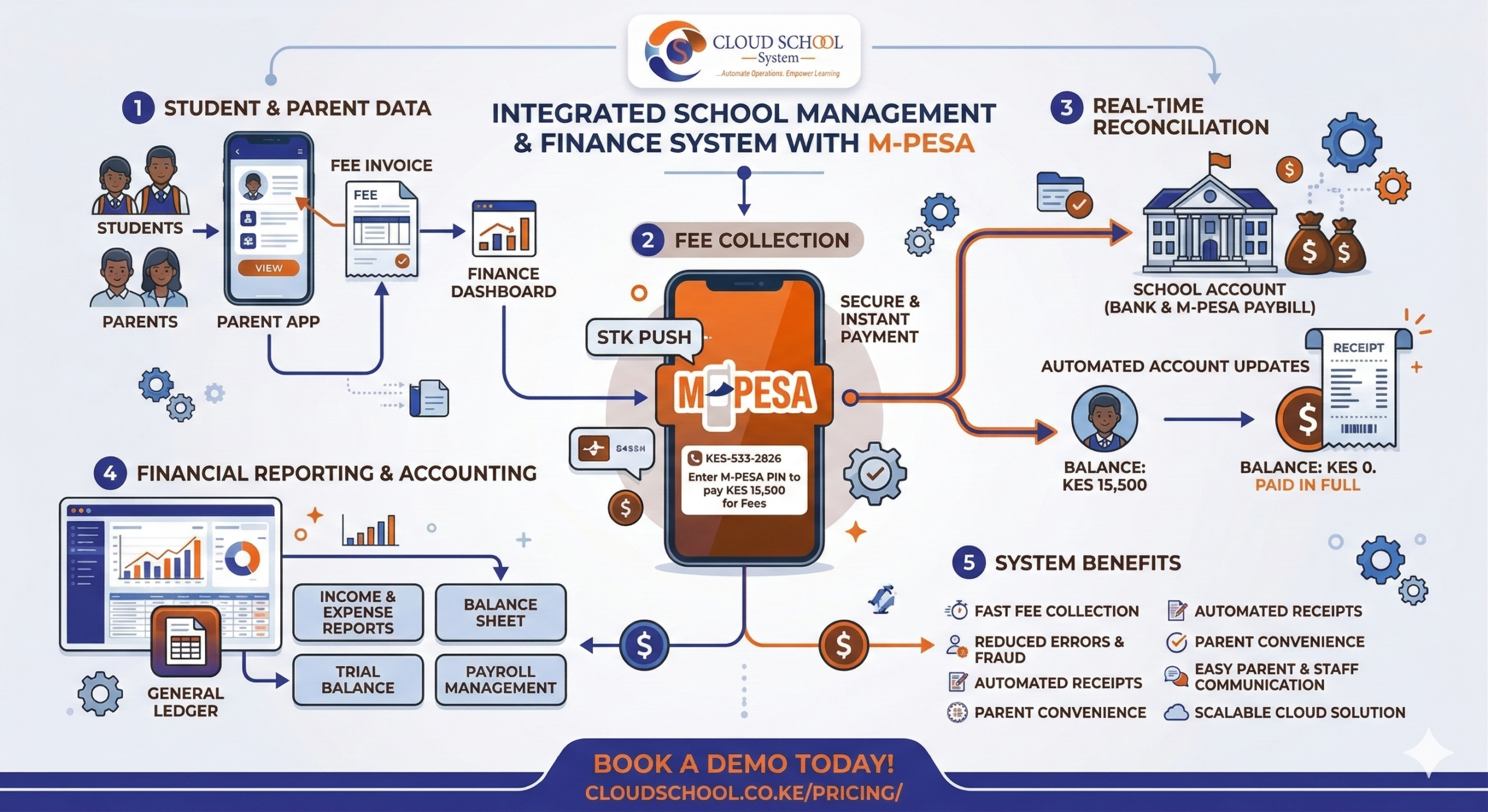
Cloud School System built a direct M-Pesa integration that eliminates every manual step in that chain. A parent pays. The system updates instantly. The bursar sees it in real time. The parent gets a receipt. No spreadsheet. No phone check. No filing.
The Problem With Manual Fee Collection
Before digital fee management, Kenyan schools operated on a system that was fragile by design. Cash payments got lost. M-Pesa messages got deleted. Bank deposit slips got misplaced. Parents disputed balances they were certain they had paid. Bursars spent hours each week reconciling records that should have taken minutes.
The risk was not just administrative. Disputes over fees damaged trust between schools and parents. Chasing unpaid balances consumed teacher time. Generating fee statements at the end of term required pulling data from multiple sources.This included bank records, M-Pesa statements, handwritten ledgers and praying the numbers aligned.
Schools that moved to Cloud School System’s automated fee management did not just solve an administrative problem. They fixed a trust problem that could arise between parents and the institution and a financial accuracy problem that was quietly costing schools money every term.
How M-Pesa Integration Works in Cloud School System
The M-Pesa integration in Cloud School System is a direct connection between the school’s fee account and the system’s finance module. It works through Safaricom’s payment infrastructure and requires no manual input from the bursar or the parent beyond the initial payment.
Here is the exact sequence of events when a parent pays fees through the system:
- Parent initiates payment: The parent sends money via M-Pesa to the school’s registered paybill or till number. They enter the student’s admission number as the account reference.
- System receives confirmation: Safaricom sends an instant payment confirmation to Cloud School System via API. This happens in seconds.
- Student account updates: The payment is automatically posted to the correct student’s account based on the admission number reference. The balance updates in real time.
- Receipt generated automatically: The system generates a digital receipt and logs the transaction with timestamp, amount, and reference number.
- Bursar sees it immediately: The finance dashboard reflects the payment instantly. No entry required. No verification step. The record is already there.
The parent never needs to visit the school to confirm payment. The bursar never needs to manually post a transaction. The school’s fee records are accurate at all times.
What Changes for the Bursar
The most immediate impact of M-Pesa integration is felt by the school bursar. The role does not disappear, but the nature of the work changes entirely.
Before integration, a bursar’s day included checking M-Pesa statements, cross-referencing names and admission numbers, manually updating balances, printing receipts, and handling parent queries about payments the system had not yet recorded.
After integration, those tasks are gone. The system handles all of them automatically. What the bursar gains is time and accuracy.
“CloudSchool allows us to manage accounts efficiently, track balances, and enable parents to pay fees online,” says Jenifer Too, Kiota School Accountant
That shift from reactive record-keeping to proactive financial management is what Cloud School System’s accounts module is designed to enable. The bursar moves from data entry to financial oversight.
The full scope of what the Accounts & Finance Suite covers goes well beyond M-Pesa including expense management, financial reporting, payroll processing, and bank reconciliation but M-Pesa integration is the feature that changes the daily rhythm of the finance office most immediately.
What Changes for Parents
For parents, the change is straightforward: paying school fees becomes as simple as any other M-Pesa transaction. No bank queues. No visits to the school bursar. No printed deposit slips to keep safe.
A parent in Mombasa whose child attends a school in Nairobi can pay fees from their phone at any time. A parent who works a long shift and cannot make it to school during office hours can pay at night. A parent who wants confirmation that their payment was received does not need to call the school since the system already has the record.
Payment Options Beyond M-Pesa
While M-Pesa is the most widely used payment method in Kenyan schools, Cloud School System’s payment integration is not limited to Safaricom’s network. The platform supports a full range of payment methods to match how different parents and guardians actually manage money.
- Mobile money: M-Pesa and Airtel Money both integrated.
- Major Kenyan banks: KCB, Equity Bank, Co-operative Bank, Family Bank, and others
- Card payments: Visa, Mastercard, and American Express all supported.
- Accounting integrations: Xero and QuickBooks support available on the Full Suite plan.
For schools that want a complete financial management solution, the Full Suite plan includes M-Banking and banking integrations, Xero and QuickBooks support, and unlimited cloud storage.
How Kenyan Schools Are Using It
Cloud School System is used across more than 500 Kenyan schools, from private primary academies running CBC to high schools on 8-4-4 and colleges on IGCSE. The schools on the clients page span institutions of very different sizes and structures, but the M-Pesa integration serves all of them the same way.
See the full list of schools currently using Cloud School System on the clients page.
The Numbers That Matter
The impact of automated fee collection is measurable. Schools using Cloud School System’s M-Pesa integration report consistent improvements across three areas: time saved, accuracy improved, and disputes reduced.
| WHAT CHANGES | THE IMPACT |
| Fee reconciliation time | Reduced from days to minutes per term |
| Payment disputes | Near-eliminated as every transaction is timestamped and traceable |
| Bursar manual data entry | Eliminated for M-Pesa and supported bank payments |
| Parent payment convenience | Pay from anywhere, any time. No school visit required |
| Fee balance visibility | Real-time for both school admin and parents via parent portal |
Which Plan Includes M-Pesa Integration
M-Pesa integration is available on both the Finance Suite and Full Suite plans. The Finance Suite is designed for schools that need fee management and financial automation without the academic modules. The Full Suite combines everything ;academic records, fee management, online learning, transport, library, M-Pesa and banking integrations, and a branded school app.
See the full plan comparison on the pricing page or book a free demo to see the finance module live in your school’s context.
Frequently Asked Questions
How does M-Pesa integration work in Cloud School System?
Cloud School System connects directly to Safaricom’s payment infrastructure. When a parent sends an M-Pesa payment to the school’s paybill or till number using their child’s admission number as the reference, the payment is automatically posted to the correct student account in real time. No manual entry is required from the bursar.
Does the system support Airtel Money as well as M-Pesa?
Yes. Cloud School System supports both M-Pesa and Airtel Money for mobile payments. The platform also integrates with major Kenyan banks including KCB, Equity Bank, Co-operative Bank, and Family Bank, as well as card payments via Visa, Mastercard, and American Express.
Can parents view their child’s fee balance and payment history?
Yes. Cloud School System includes a parent portal where parents can log in to view their child’s current fee balance, past payment history, and outstanding amounts. This reduces the number of queries directed to the school bursar and gives parents accurate, real-time financial information.
Does M-Pesa integration work for multi-campus schools?
Yes. Multi-campus school groups can manage fee collection across all branches from a single Cloud School System dashboard. Each campus operates within the same platform, and the finance module consolidates all payment data in real time.
Which Cloud School System plan includes M-Pesa integration?
M-Pesa integration is included in the Finance Suite and Full Suite plans. The Finance Suite covers fee management, accounts, transport, and messaging. The Full Suite adds academic modules, online learning, library management, banking integrations, Xero and QuickBooks support, and a branded school app. Contact the team for a quote at +254 798 067 754.
Is Cloud School System used by CBC schools in Kenya?
Yes. Cloud School System supports CBC, 8-4-4, IGCSE, and ACE within the same platform. Over 500 Kenyan schools across these curriculum types currently use the platform, including private primary schools on CBC, high schools on 8-4-4, and colleges on IGCSE.
Ready to Remove Manual Fee Collection From Your School?
Cloud School System’s M-Pesa integration is live and working in over 500 Kenyan schools today. The setup is straightforward, the system is cloud-based, and your team can be trained and operational within days.
Call, Text or WhatsApp our sales team on +254 798 067 754 to ask any questions or see a live demo of the finance module.
Book a free demo here and see exactly how M-Pesa integration, automated receipting, and real-time balance updates work.